


FishVerify: ID & Regulations
4.3245.00 Reviews
App Specs
- Version
- 5.7
- Updated On
- License
- Free
- Downloads
- 100,000+
- Developer
- FishVerify, LLC.
- Categories
- Sports
- Platform
- Android
Screenshots
 Analysis by AppCompare
When I’m sorting through fishing apps, I care less about a long feature list than whether I can get a useful answer while I’m standing by the water. A fish identifier has to be quick to consult, and a regulations tool has to make me pause before I keep a catch. FishVerify: ID & Regulations aims to bring those jobs together, with catch logging and other trip information alongside them. I see it as a practical companion for anglers who want a little more confidence in the moment, not as a substitute for knowing their local rules.
What a fishing trip asks of an app
The most useful time to identify a fish is often not when you’re relaxed at home. It’s when your hands are wet, the catch is moving, and you need to decide what to do next. In that situation, an app can help you slow down and check your thinking. I’d take a clear photo before handling the fish more than necessary, then compare the identification with the location and the fish’s visible characteristics rather than treating a label as final proof.
That small workflow matters because look-alike species can be difficult to distinguish in a rushed snapshot. A side-on image with the fish visible from head to tail is more useful than a close crop or a photo taken in deep shadow. If the result seems surprising, I’d take another picture and consult a reliable local source before keeping or releasing the catch. The app is most valuable as a prompt to verify, not as permission to skip judgment.
Where it fits among fishing tools
Many anglers rely on a mix of phone camera searches, saved web pages, printed rule summaries, and notes in a regular notebook. Each can work, but switching between them while managing tackle is awkward. This app’s appeal is that identification, regulation checks, and a catch record sit within one fishing-focused experience. That makes it more convenient than starting a general web search every time, particularly when you fish more than one area.
Still, I wouldn’t expect one app to be the best source for every question. A government or local fisheries page is the better final check when a rule is complicated, recently changed, or tied to a specific body of water. A paper notebook may be preferable if you want a completely offline record without entering information on a phone. FishVerify’s strength is convenience and context; the trade-off is that you should keep a trusted local reference in mind for decisions with legal or conservation consequences.
A more deliberate catch workflow
I’d use the logbook for more than simply collecting fish photos. A short note about the conditions or the spot can help make a record meaningful when I look back later. For example, noting whether I was fishing from shore or a boat, what bait I used, and what I observed around the catch gives the photo context. These are suggestions for how to make a personal log useful, not a claim that the app automatically records those details.
There’s also a practical order to using the features: check the area information before leaving, identify a catch when you can photograph it clearly, review the relevant rules, then record the details while they’re still fresh. That order reduces the chance of relying on memory at the end of the day. If connectivity is unreliable, preparing the information you expect to need before setting off is a sensible precaution rather than assuming every screen will be available in every circumstance.
Worth Reading Before You Choose

Flipboard Shows What News Apps Must Do Beyond the Feed

Switching to Android Auto Means Rethinking Your Driving Routine

Google Calendar Makes a Crowded Week Easier to Manage

Ludo King Makes the Most of the Minutes Between Plans

Baby Panda World Brings Quick Play to Modern Phones, but Its Game Library Feels Busy

ESPN’s Live Game View Makes Following Close Games Easier
Who will get the most from it
I think this is a good fit for recreational anglers who sometimes encounter unfamiliar species, visit different fishing areas, or want their catches organized in one place. It can also suit a newer angler who is learning to connect identification with responsible decisions. Someone who fishes the same familiar spot and already knows the local rules may use the logbook or weather and tide information more than the identification tools.
On the other hand, I wouldn’t make it my only resource if I were fishing somewhere with complex restrictions, targeting a species that is hard to distinguish, or working with a poor signal and no preparation. A dedicated local rules source may be a better choice for exact legal interpretation, while a simple camera or notebook may be enough for anglers who only want photographs and memories. The right choice depends on whether the combined tools are useful to your routine.
Hooked on Features
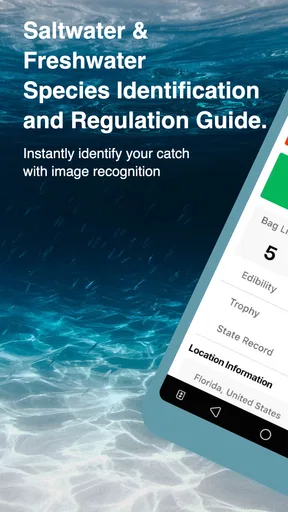
First off, let’s dive into what makes FishVerify so darn useful. The app is designed to help you identify fish species and ensure you’re following the latest fishing regulations, which can be a lifesaver if you’re fishing in different areas with varying rules.
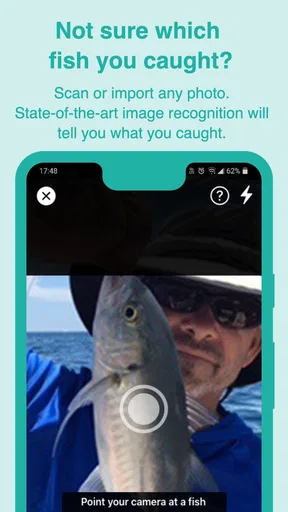
The app uses your phone’s camera to snap a picture of your catch, and boom – it identifies the fish for you. The image recognition technology behind this is pretty impressive. It’s like having a marine biologist in your pocket, and I’m here for it.
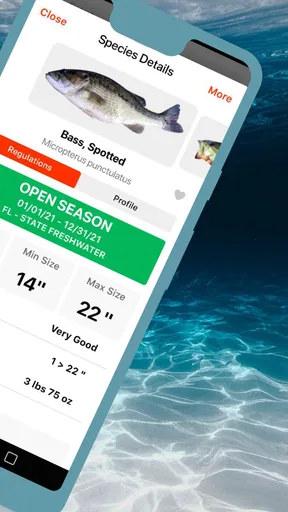
Once you’ve identified your fish, the app provides you with the relevant regulations for that species. You’ll know if it’s in season, the catch limits, or if it’s a protected species. No more guessing and hoping you’re not breaking any rules. This is particularly handy if you’re hopping between different fishing spots.
User Experience and Design
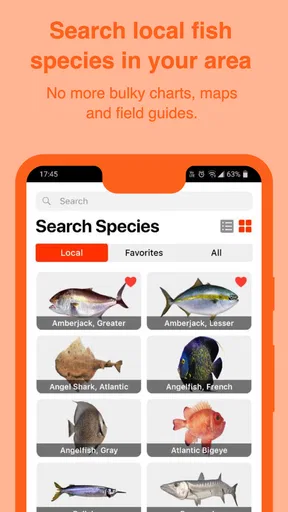
Now, let’s chat about the user experience. The interface is clean and simple, which I appreciate because the last thing I want when I’m out in nature is fiddling with a confusing app. The menus are intuitive, and navigating through the features is a breeze.
I’m also a fan of the offline mode. I can save the data for the areas I’m going to fish, which is perfect because the best fishing spots are often where the cell signal is weakest. You know what I mean? It’s nice to have the app still function even when I’m off the grid.
Catch More Than Just Fish
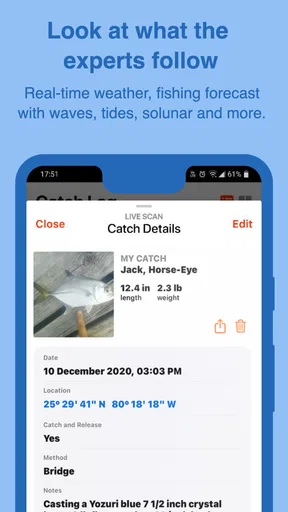
Aside from identifying fish and checking regulations, FishVerify also provides some cool extras. There’s a logbook feature where you can record your catches, complete with photos, locations, and notes. It’s like a digital diary for your fishing adventures.
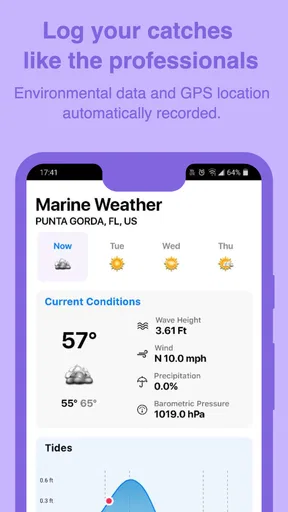
Plus, for those of us who like to keep an eye on the weather, the app offers weather updates and tide information. It’s all about being prepared, and this feature ensures you know if a storm is brewing or if the tide is about to turn.
Speed, stability, and everyday expectations
FishVerify is a fishing app from FishVerify, LLC., and I’d approach its speed expectations with the realities of an outdoor trip in mind. Taking a picture and checking an entry should feel like a short task, but image identification and loading information can depend on conditions such as signal quality and the photo itself. I wouldn’t judge it by whether every answer appears instantly in a remote spot; I’d judge it by whether the steps remain manageable and the result is clear enough to check.
For a busy day, the app is likely to see its heaviest use when I’m moving between spots, checking several catches, and keeping notes rather than during one quick identification. That’s when preparation pays off: save the area information you need before leaving, keep photos focused, and add brief notes as you go instead of trying to reconstruct the day later. These habits also make it easier to notice when a result or rule deserves another look.
As with any phone tool used outdoors, I’d keep battery and screen time in mind. Repeated camera use, checking conditions, and browsing while away from a charger all compete with the rest of the phone’s needs. I’d bring a charged device and avoid leaving the display active between tasks. I can’t infer exact battery or storage demands from the app’s role, so I’d treat it as one useful part of trip preparation rather than something to keep running continuously.
Reliability means checking the answer
A useful fishing app should help me make a better decision, but fish identification is not a situation where I’d blindly accept the first result. A poor angle, glare, or a fish that resembles another species can undermine a photo-based suggestion. I’d use the image as a starting point, compare it with what I can actually see, and then review the relevant regulation for the place I’m fishing. If any part of the answer conflicts with what I know locally, I’d stop and verify through an official source.
The same careful approach applies to changing conditions and rules. The app can make it easier to consult information, but I still need to be responsible for checking that it applies to the exact area and situation. That’s especially important when a decision affects whether a fish can be kept. I like tools that reduce guesswork, but I don’t confuse convenience with legal authority.
Device fit and practical limits
The app is free to download, is rated for Everyone, and its current version is 5.4, with Android support beginning at version 8.0. It has an average rating of 4.2 from over six hundred ratings, and more than one hundred thousand installs. Those figures suggest that plenty of people have tried it, though they don’t tell me whether it will suit a particular phone or fishing routine. I’d check that my device meets the system requirement before planning to depend on it outdoors.
There are in-app purchases, with listed items ranging from $0.99 to $47.99, so I’d review any purchase screen carefully and decide whether an optional item is worthwhile for my needs. The app was released on April 5, 2018, and its age gives it a history as a fishing tool, but I would still make sure it is updated and working before relying on it for a trip. Ratings and installs are useful context, not a guarantee of uninterrupted performance or perfect identification.
When I’m choosing between this and a general-purpose fishing reference, I’d favor FishVerify if I want species identification and several trip-related tools together. I’d favor an official local regulation page when I need the most authoritative interpretation, and I’d choose a basic notebook if my priority is a record that doesn’t involve a phone. That distinction makes the app easier to assess: it is most useful when its combination of tools saves me from juggling separate resources.
Is It Worth the Catch?
So, should you cast your line and download this app? In my opinion, if you’re someone who loves fishing and wants to make sure you’re doing it responsibly, FishVerify: ID & Regulations is worth checking out. It’s packed with features that make fishing trips more enjoyable and less stressful.
One thing to keep in mind, though, is that while the app covers a broad range of species and regulations, it’s always good to double-check local rules, especially in less common fishing spots. The app is a fantastic guide, but a little due diligence never hurts.
Overall, FishVerify seems to be a reel-ly great tool for anyone who loves spending time on the water. It combines technology with the art of fishing in a way that enhances the experience and keeps you informed. So, next time you head out, give it a shot and see if it helps you land the big one!
Pros
- Accurate fish identification tool.
- Real-time fishing regulation updates.
- User-friendly interface design.
- Offline access to key features.
- Comprehensive species database.
Cons
- Requires subscription for full features.
- Limited to certain geographic regions.
- Occasional app update issues.
- Initial setup can be time-consuming.
- Some features need internet connection.
FAQs for FishVerify: ID & Regulations
What is FishVerify: ID & Regulations used for?
FishVerify: ID & Regulations is an app designed to help anglers identify fish species and stay informed about fishing regulations. By using image recognition technology, the app can quickly provide information about the fish caught, including its species and whether it complies with local laws and guidelines.
How accurate is the fish identification feature?
The fish identification feature in FishVerify is highly accurate, thanks to its advanced image recognition technology. By analyzing uploaded photos, the app can match the fish to its extensive database, ensuring users receive reliable information. However, users should ensure clear photos for optimal results and cross-check with local regulations.
Does FishVerify work offline?
FishVerify requires an internet connection for the initial setup and for accessing the most current fishing regulations. However, once the fish species have been identified and cached, users can refer to that information offline. Regular updates are recommended to maintain access to the latest regulatory changes.
Are the fishing regulations up to date?
FishVerify strives to provide the most current fishing regulations by regularly updating its database. Users should ensure they have the latest version of the app and periodically refresh their data to stay informed about any changes in local fishing laws and restrictions that may affect their fishing activities.
Is FishVerify available for both Android and iOS devices?
Yes, FishVerify is available for download on both Android and iOS platforms. Users can find it on the Google Play Store for Android devices and the Apple App Store for iOS devices. The app is designed to provide a seamless experience across both operating systems, ensuring accessibility for a wide range of users.


